
QR Code Creator (Beta)
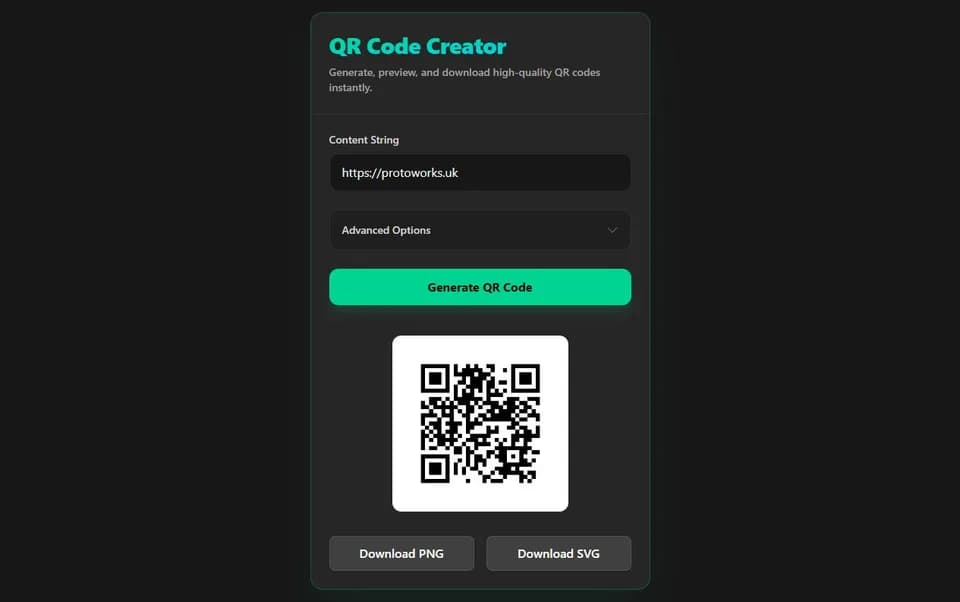
Enter the link, choose the styling, press Generate QR Code and download the result, with nothing installed.
What it does
There is no upload step and no account. This is a small React application that renders the code in the page itself: enter the content, choose the colours, margin, logo and error-correction level, then press Generate QR Code and the finished pattern appears ready to download.
Generation happens locally in the browser, so the text or URL you encode is never part of a server round trip. That makes it workable at an event, in a workshop or on a site where you would rather not hand a private link to an advertising-funded generator.
Key features
- Generate QR Code button that builds the code on request
- Foreground and background colour pickers
- Adjustable quiet-zone margin
- Error correction at Low, Medium, Quartile or High
- PNG, JPG or SVG logo overlay
- Logo overlay forces High error correction and adds a background pad
- Adjustable logo scale
- PNG export and SVG export
- Generation runs locally in the browser with no server round trip
The application itself is built with Vite, React, TypeScript and Tailwind CSS. That stack matters less to the person using it than to the person maintaining it, but it does mean the whole tool is a static front end that can be hosted anywhere and audited without a backend.
Export and customisation
Styling a code is a balance between matching the artwork and staying readable by a scanner. The controls are limited to the choices that change that balance, so there is nothing to tune that cannot affect whether the code works.
Colour
Separate pickers for the foreground modules and the background. Contrast is what a scanner actually needs, so dark-on-light remains the safe choice; inverted codes look striking but are not equally well supported by every phone.
Quiet zone
The margin around the code is adjustable rather than fixed. Printed labels and packaging often need a specific margin to sit correctly inside artwork, and a code placed hard against other graphics will scan poorly.
Error correction
Low, Medium, Quartile and High are selectable. Higher levels duplicate more data, which lets the code survive damage or an overlaid logo, at the cost of a denser pattern for the same content.
Logo overlay
A PNG, JPG or SVG image can sit in the centre of the code. Adding one forces High error correction and places a protective background pad behind the image, and the logo scale is adjustable so it does not eat the modules a scanner needs.
Two exports are offered. PNG is the practical choice for a slide, a web page or a quick label. SVG is the choice for print: the code stays vector, so the modules scale to any size without softening. A logo is embedded in that SVG as an image, so an SVG logo stays vector while a PNG or JPG logo stays raster. Test-scan the exported file with a phone before sending it to a printer.
Beta limitations
An aggressive logo size, low contrast between the two colours, or a margin that disappears into the surrounding artwork can all make a technically valid code hard to scan. The tool applies sensible safeguards, but nothing beats scanning the finished file at the distance it will actually be read from.
Nothing generated here is stored by Protoworks, so keep your own copy of anything worth reusing. Dynamic codes, where the destination can be changed after printing, are not part of this tool.
Privacy: it runs in your browser
Generation happens in the page, so the text or URL you encode never reaches a server. Nothing is stored by Protoworks and there is no generated-code history to leak. That suits links with access tokens, internal addresses or unannounced campaign URLs that should not sit in someone else's database, though the export itself is still only as private as wherever you save it.
Who it suits
- Anyone who needs a branded code for a flyer, label, business card or exhibition stand.
- Designers who want a vector file that can be placed in print artwork without redrawing it.
- Engineers adding a configuration or documentation link to a physical object or test rig.
- People who would rather not paste a private link into an advertising-funded generator.
This is the same shape as the internal tools and client utilities I build: a small static front end that does one job and holds on to nothing.
Other demos and tools
Gerber Viewer
Open a Gerber and Excellon drill archive in your browser and check PCB layers before fabrication.
G-Code Viewer
Preview a 3D printing G-code file in 3D before you print, step through the toolpath and keep the file on your device.
Calculation Workbench
Solve Ohm's law, power, resistor and capacitor networks, voltage dividers, LED resistors and IPC-2221 track width, with worked steps.
See the complete set on Demos & Tools, or read about the wider range of applications I build on the software solutions page.
Questions
Can I add a logo?
Yes. A PNG, JPG or SVG image can be overlaid in the centre of the code. Adding a logo forces High error correction and places a background pad behind it, and the logo scale is adjustable.
What can I export?
Export a PNG for raster use or an SVG for print. The QR modules stay vector in the SVG export, so the code itself scales without pixelation. A logo is embedded in that SVG as an image: an SVG logo stays vector, while a PNG or JPG logo stays raster at the resolution supplied.
Is my content uploaded?
No. The code is generated locally in your browser when you press Generate QR Code, so the text or URL you encode is not sent to a server and is not stored by Protoworks.
Which error-correction levels are available?
Low, Medium, Quartile and High. Higher levels add redundancy but also data density, and High is applied automatically when you overlay a logo.
Need a tool like this for your own workflow?
Small browser utilities are often the cheapest way to remove a recurring manual step. If your team keeps repeating the same calculation or file conversion, describe it and I will tell you how much work it really is.
Get in touch