
G-Code Viewer (Beta)
Choose a .gcode file, or load the bundled example, and see the toolpath in 3D straight away, with nothing installed.
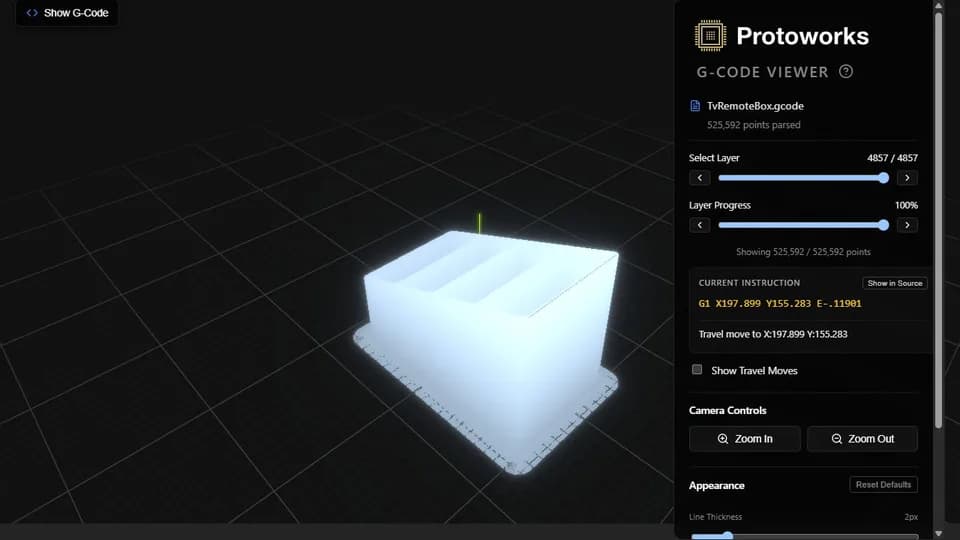
What it does
A G-code file describes a print as a sequence of moves, and once a file has been passed on or edited, that sequence is the only description of what the printer will do. This viewer reads the file in the browser and draws those moves as a 3D toolpath, so you can see what the printer has actually been told to do.
Choose a .gcode file with the Choose File input, or press Try Example to load the bundled one. Extrusion moves are drawn in blue and travel moves in orange by default, so the difference between the part and the hops between its features is immediate. A playback slider follows the path in order, and travel moves can be hidden entirely when you only care about the shape being built.
Key features
The controls are few on purpose. Load a file, orbit the model, drag the slider, and switch travel moves on or off. Everything else is left to the slicer, where it belongs.
Technical notes
The viewer is a React application rendering through Three.js. That combination makes a large scene practical in a browser tab, but only if the file is handled carefully, so most of the work is in how the data is read and drawn rather than in the scene itself.
Geometry
Every move becomes a line segment in a single Three.js geometry. Optimised LineSegments with shared buffers keep the draw cost low on the large files the 50 MB per-file limit allows.
Parsing
A custom parser walks the file rather than relying on a general-purpose reader. Comments are stripped as the file is read, which frees a surprising amount of memory on files generated with verbose slicer notes.
Responsiveness
User-interface updates are deferred so dragging the playback slider never waits on 3D work. The scene catches up while the controls stay smooth.
Beta limitations
It is a viewer, not a slicer. It does not generate G-code, does not model extrusion physics and does not predict whether a print will succeed. What it shows is the path the file describes; judging temperatures, cooling, filament behaviour and support strategy is still your call.
It reads .gcode files only, with a 50 MB cap on each file, so a file above that limit has to be re-exported or split in the slicer first. Machines with limited graphics memory may struggle with the largest files within that cap even though the parser copes, because the file is read into memory in full.
Privacy: it runs in your browser
Your G-code is read locally and never uploaded. Print files often carry part geometry, customer names in comments or the settings of a machine that is not yours to share, and none of that leaves the device. Closing the tab discards the loaded file.
Who it suits
- Makers checking a downloaded or shared profile before committing filament and time to a print.
- Anyone diagnosing a file that starts printing in an unexpected place or order.
- Designers who want to see how a part orientation will build without reopening the slicer.
- People reviewing a file on a machine where installing a desktop slicer is not an option.
If a print problem turns out to be firmware, tooling or a control application rather than a file, that is the sort of embedded work I do.
Other demos and tools
Gerber Viewer
Open a Gerber and Excellon drill archive in your browser and check PCB layers before fabrication.
Calculation Workbench
Solve Ohm's law, power, resistor and capacitor networks, voltage dividers, LED resistors and IPC-2221 track width, with worked steps.
QR Code Creator
Generate a styled QR code in your browser with your own colours, logo and error-correction level, then export PNG or SVG.
Every tool is listed on Demos & Tools, and the broader catalogue of applications and services I build is on the software solutions page.
Questions
Does it upload my G-code?
No. The file is read and parsed in your browser. Your G-code stays on your device and is not uploaded to a server.
Can it handle large files?
It accepts .gcode files up to 50 MB each. Within that limit it is built for large files: the geometry uses optimised LineSegments with shared buffers, user-interface updates are deferred, and comments are stripped to keep memory use down.
Can I step through a print?
Yes. A playback slider moves through the toolpath in order, so you can follow the nozzle path as the print builds up. You can also hide travel moves to see the printed geometry clearly.
Does it predict whether a print will succeed?
No. It shows the toolpath the file describes. It is not a slicer and does not predict print success or replace your own judgement of the settings behind the file.
Working on something similar?
This viewer is here to show what a browser tab can do with a large data set: a large toolpath parsed in the page and drawn as geometry you can orbit and play back. If you have a large data set that needs a usable interface, tell me about it and I will say plainly whether it is a good fit.
Get in touch