
Gerber Viewer (Beta)
Open a Gerber archive and look at the layers immediately, before any fabrication order is placed.
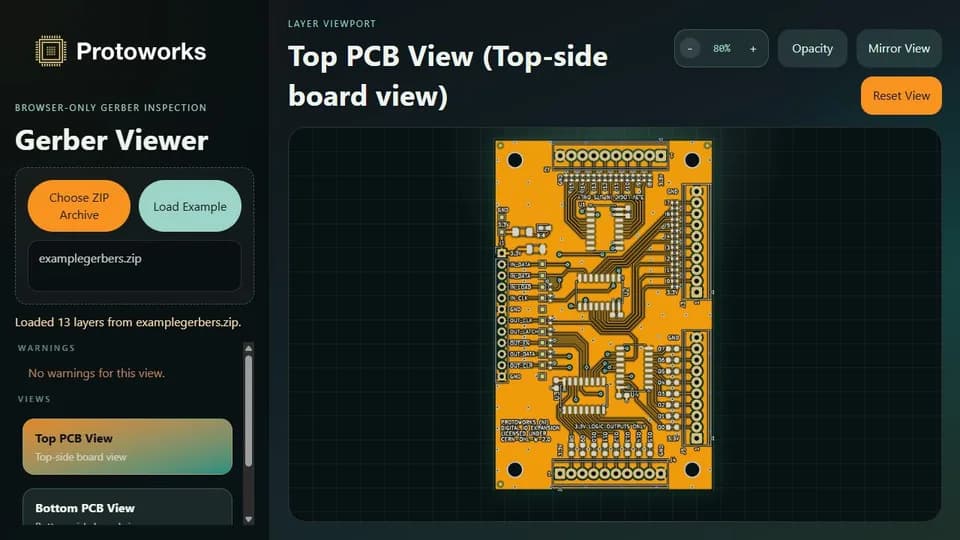
What it does
Fabrication houses quote from a ZIP archive of Gerber layers and Excellon drill files, and that archive is the last chance to catch a wrong layer, a missing outline or a drill file that belongs to an older revision. The viewer opens the archive in your browser and turns it into something you can look at: each layer rendered on its own, plus assembled Top PCB and Bottom PCB composite views.
Import is a plain file choice: point the page at the archive you would otherwise send to the fabrication house. Parsing and SVG generation happen in a Web Worker, so the interface keeps responding while an archive is processed, and a bundled examplegerbers.zip archive lets you see how the viewer behaves on a known-good board before trying your own files.
Key features
The viewer is deliberately narrow in scope. It does a small number of things well enough to answer the question you actually have before ordering boards: is the data here what I think it is?
- Browser-local ZIP import of Gerber and Excellon drill files
- SVG conversion in a Web Worker
- Individual layer views plus Top and Bottom PCB composites
- Layer names from %TF.FileFunction metadata with filename fallback
- G01, G02 and G03 interpolation, G36/G37 regions and arcs
- Warnings panel for parsing notes
- Deep zoom and pointer panning
- Bundled examplegerbers.zip sample archive
Composite views are assembled from the layers the viewer recognises, so a top-side copper and silkscreen view is one selection rather than a manual stack. Wheels zoom to a deep level and pointer drag pans across a board without losing position, which matters when you are checking a single pad or a footprint courtyard.
Technical notes
Layer names come from %TF.FileFunction metadata when the export includes it, with a fallback to conventional filenames and extensions such as .gts, .gbs and .gbo when headers are missing. That fallback is why renamed exports still usually render in a sensible order.
On the Gerber side the parser covers the structural parts of RS-274X that carry geometry: G01, G02 and G03 interpolation, G36 and G37 region fills, and arcs rebuilt as implicit multi-quadrant arcs. Excellon drill files are read with mixed or fixed-precision coordinates across .drl, .xln and .txt inputs, including tool definitions in the T1C0.400 form.
A warnings panel reports what the parser did with the currently selected view, so unusual constructs announce themselves instead of failing silently. Read it before trusting a layer that looks sparse or empty.
Beta limitations
This is a viewer focused on speed and privacy, not a complete RS-274X fabrication or DFM analyser. It has been tested mainly against KiCad exports, and those are the inputs I would trust most. Output from other tools usually works, but unusual aperture definitions can expose gaps.
Macro apertures are expanded when the macro defines an outline primitive, so those pads render at their true shape. A macro without an outline primitive falls back to a bounding box, so that pad can appear as a rectangle. Arbitrary layer stacking and boolean operations between layers are not supported in the current beta. Nothing here replaces the checks your fabrication house runs, so treat it as a second pair of eyes and not as sign-off.
Privacy: it runs in your browser
The archive is read, parsed and converted inside the page. No Gerber or drill data is uploaded, and nothing about the board is stored by Protoworks. That matters for unreleased designs under NDA, where sending a ZIP to an unknown conversion service is usually not acceptable. My NDA and confidentiality guidelines set out how I treat confidential material.
Because processing is local, the archive is not sent anywhere after the page loads. Closing the tab clears what was in memory, so a refresh means choosing the archive again.
Who it suits
- Anyone about to send a board to fabrication who wants a quick visual check of the exported layers.
- Hardware developers reviewing someone else's export without opening a full CAD package.
- Designers checking that a drill file matches the revision of the copper they are looking at.
- People who need to inspect a board on a borrowed machine and cannot install anything.
If the check turns into a design problem, that is the sort of work I take on directly: circuit and PCB design files, embedded firmware and the documentation that goes with them.
Other demos and tools
G-Code Viewer
Preview a 3D printing G-code file in 3D before you print, step through the toolpath and keep the file on your device.
Calculation Workbench
Solve Ohm's law, power, resistor and capacitor networks, voltage dividers, LED resistors and IPC-2221 track width, with worked steps.
QR Code Creator
Generate a styled QR code in your browser with your own colours, logo and error-correction level, then export PNG or SVG.
All four tools are listed together on Demos & Tools. The wider catalogue of software I build and adapt, including client portals and APIs, is on the software solutions page.
Questions
Does it upload my PCB files?
No. The archive is opened and converted inside your browser. Gerber and drill data is not sent to a server and is not stored by Protoworks.
Which files can it open?
It reads ZIP archives containing RS-274X Gerber layers and Excellon drill files, so a standard fabrication export works. It has been tested mainly against KiCad exports, which are the most reliable input.
Can it replace a fabrication DFM check?
No. It is a lightweight viewer, not a complete fabrication or DFM analyser. Use it to catch obvious layer and geometry mistakes, then confirm the design with your fabrication house's own checks.
What can I inspect?
Individual layers and the Top and Bottom composite board views, covering copper, mask, silkscreen, outline and mechanical layers plus drill data. You can zoom deeply, pan across the board and read the warnings panel for parsing notes.
Need a PCB or firmware built?
I design circuits, custom PCBs and embedded firmware, and supply the design files and documentation rather than physical boards. If the viewer raises a question about your own design, send me a short outline and I will tell you whether it is something I can help with.